
Skip to content
OfficeOne

The workspace for growing companies

Your whole company,on a single screen.

OfficeOne is your team’s desktop inside the browser. The CRM, chat, wiki, tasks, time tracking and invoicing open as windows of the same system, with one sign-in and nothing to install.

A 20-minute guided demo on your own use case.

The problem

Seven tabs, seven passwords, no context

A small company’s work is spread across tools that never talk to each other. Each with its own sign-up, its own invoice and a user list nobody keeps up to date.

Today

Every tool with its own user, password and invoice.

With OfficeOne

One sign-in for the whole team and one account per person.

Today

The same customer spelled three ways in three places.

With OfficeOne

Apps share identity, permissions and notifications.

Today

Someone leaves and you have to remember six places to remove them.

With OfficeOne

Revoke access once and they are out of everything.

Today

Nobody knows what happened yesterday without opening five apps.

With OfficeOne

One calendar and one notification centre covering every app.

The catalogue

Nine apps, already in place

You turn them on from the workspace app store and they show up in your team’s dock. Install only what you use.

  • CRM

    Customers, contacts, deals and sales tasks, with the pipeline in plain sight.

    crm

  • Chat & meetings

    Channels, direct messages and video calls with recording and transcription.

    base-chat

  • BrainOne

    Your company’s brain: linked pages, meaning-based search and per-department permissions.

    base-wiki

  • Tasks

    List, board and calendar. With focus mode and a weekly review.

    todolist

  • Time tracking

    Working hours, absences and shifts per site, plus the team’s virtual office.

    base-fichaje

  • Notes

    Quick notes and checklists with reminders, labels and a bin.

    base-notes

  • Diagrams

    Diagrams and sketches several people edit at the same time.

    draw

  • Invoicing

    Spanish invoicing with signed, chained records under Royal Decree 1007/2023.

    facturation

  • OneSecret

    Encrypted credentials that travel by reference: people and assistants use them without ever seeing them.

    onesecret

Need something else? We build custom apps that live on the same desktop, under the same permissions.

In depth

Two that don’t fit in four lines

What the company knows and what the company keeps. Two apps in the catalogue worth telling slowly, because they are the ones that make the assistant worth having without letting your knowledge or your credentials leak on the way.

BrainOne

base-wiki

The company’s brain. Not a drawer full of documents: the memory that stays when someone goes on holiday, changes role or leaves.

  • Pages that link themselves

    You write by linking, and the graph is drawn from those links both ways. Opening a page shows what mentions it, not only what it mentions.

  • Search by meaning

    You search for what you mean, not for the exact word somebody typed eight months ago. Underneath it is vector search, not a “contains”.

  • Databases and attachments

    Tables with views and filters inside the pages themselves, and files — images, PDFs, spreadsheets — stored in the workspace and linked from the text.

  • Per-department visibility

    A page can belong to the whole company, to one department or only to you. Subpages inherit the restriction above them, so nothing slips out by accident.

  • This is where the assistants read and write

    Each person’s assistant connects over MCP with their permissions, not with a technical user’s. It reads what that person could read and writes what that person could write.

  • Served at brain.officeone.vadere.ai, and it also opens as a window inside the desktop.
  • Several people edit at once, each cursor visible to the others.
  • It imports real Markdown, links included, so an Obsidian vault comes in whole.
  • The visible name is BrainOne; underneath it is still base-wiki, and that identifier is what rules permissions and database.

OneSecret

onesecret

The safe. It stores credentials, but what sets it apart is what it does with them: letting a person or an assistant use one without ever seeing it.

  • What travels is the reference

    Through the chat, the logs and the assistant’s memory travels onesecret://KEY, never the value. The credential does not leave the server.

  • The server runs the operation

    The agent does not ask for the password: it asks for an action against a specific target. OneSecret runs it with the credential in place and returns only the result.

  • Permission per operation, not per domain

    An operation authorises one call to one address. Being able to list a zone’s DNS records grants no power to create them, nor to touch billing.

  • Anything that changes things asks a person

    An operation marked as a mutation waits for human approval. The agent proposes it; a person signs it.

  • A log that cannot be rewritten

    The audit trail is insert-only: a Postgres trigger refuses updates and deletes on it. Not even the app’s own credentials can change what happened.

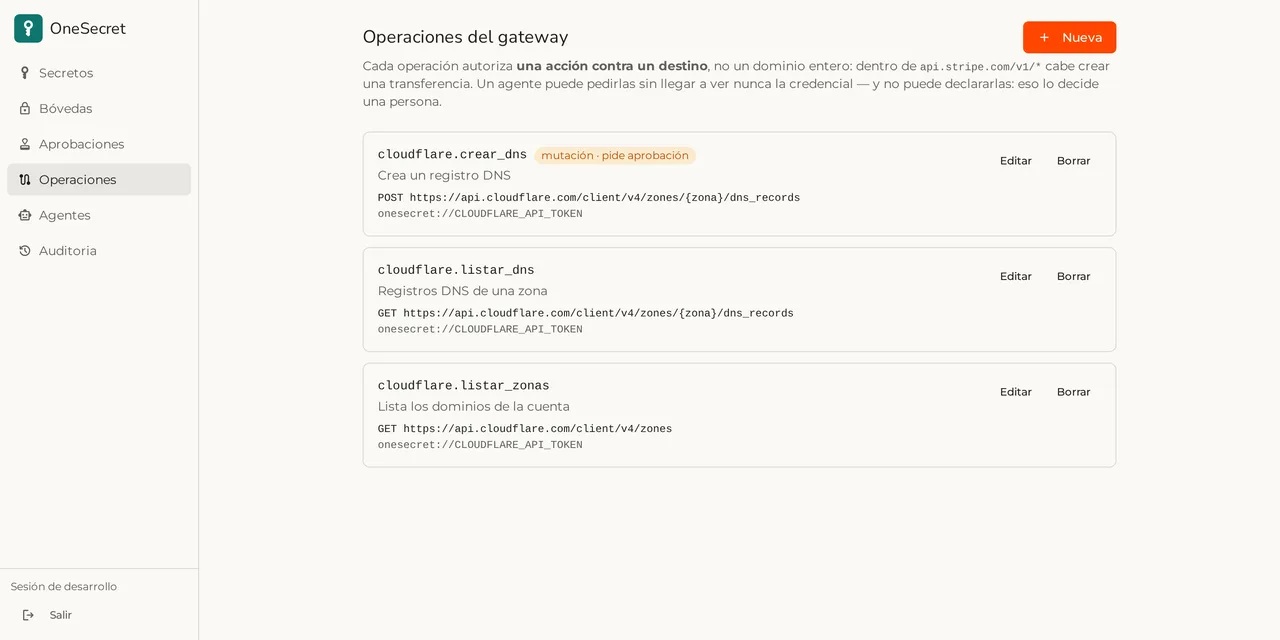
OneSecret gateway operations screen, showing three Cloudflare operations that use the reference onesecret://CLOUDFLARE_API_TOKEN
The gateway operations. Each one points at a specific address and uses the credential by reference — whoever runs it never sees it.
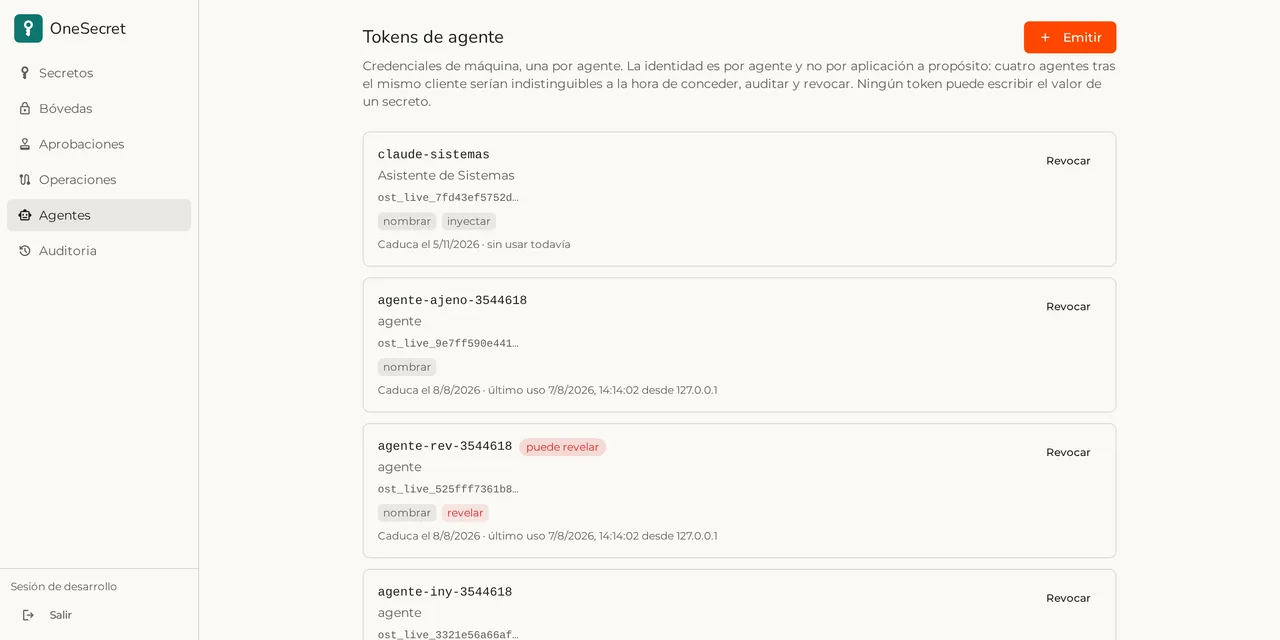
OneSecret agent token inventory, showing the capabilities granted to each one
One token per agent, with its capabilities in plain sight and revocable one by one. None of them can write a secret’s value.

How the work feels

An operating system, not a folder of links

Apps don’t live in scattered tabs: they open in windows you can move, resize and keep side by side.

Real windows
Open the CRM next to chat, drag it, resize it or go full screen. Work stops being a walk between tabs.
One day, one view
The calendar pulls meetings from chat, tasks from the CRM and from your list into a single timeline.
Notifications that arrive
A badge on the dock, in the tab title and on your phone. Click it and the exact conversation opens.
Yours from day one
Light and dark themes, your company logo and each app’s own colour where it belongs.

Assistant

Ask the desktop and it gets done

One is the workspace assistant. It doesn’t just answer: it uses the tools of the apps you installed — searches the CRM, checks your calendar, creates the task — and asks before writing anything.

  • It only works with what the person can see: it inherits their permissions.
  • It confirms before creating, changing or deleting.
  • You pick the provider: Anthropic, OpenAI or an open model on your own server.

And if you already use your own agents, they come in too

OfficeOne speaks MCP, the standard protocol AI assistants use to connect to tools. That means whatever assistant your team already uses — Claude, Cursor, any of them — can work against your workspace with nobody copying and pasting anything.

  • With the permissions of whoever authorised it

    The agent does not come in through a shared technical account: it comes in as the person who granted it access, and sees exactly what that person would see.

  • Authorise once, revoke whenever

    Removing the grant cuts the agent off, even if it is still configured on the machine of whoever was using it.

  • Not a promise — it already works

    BrainOne connects this way today from Claude and from Cursor. This very site was written while consulting the company wiki over that channel.

Control

Who gets in, what they see, where the data ends up

The workspace is the single source of identity. Apps have no users and no passwords of their own.

  • One sign-in, revoked once

    Single sign-on with OpenID Connect. Remove someone from the workspace and they are out of every app.

  • Permissions per app and per role

    Each app declares its permissions and roles. You decide who sees the CRM, who invoices and who only reads the wiki.

  • Each company’s data kept apart

    One company cannot reach another’s data, and not because of a check on screen: it is closed off in several layers, down to the deepest one, and tested on every release.

  • Reviewed properly

    The workspace and its apps go through regular security reviews, with every finding verified and fixed before it ships.

Custom work

What your company does and nobody else does

This is the real difference. With ordinary software you either change how you work so it fits the program, or you pay for a bolt-on that breaks at every upgrade. We build the app you are missing, and it enters your desktop as one more.

  • Not a bolt-on — another app

    It opens in its own window, uses the same sign-in and shows up in the launcher and the dock. Whoever uses it cannot tell it is “the custom one”.

  • Only your company sees it

    It never enters the public catalogue and no other customer sees it. It is yours, and what it does stays between your team and us.

  • It inherits everything already there

    Role permissions, the shared calendar, notifications, the assistant. Nobody has to decide who sees what again: the workspace already decided.

  • Your data wherever you say

    A tailor-made app can keep its data in a database of your own, separate from everything else.

  • Up to date without breaking

    When the desktop moves to a new version, your app keeps working. It is not a patch glued on top of somebody else’s closed product.

Patient records, the workshop and the invoicing of a chain of hearing-care centres already run this way, as does the skin diagnosis of a pharmacy network.

Tell us what you need

Getting started

Three steps and your team is in

  1. 01

    We set up your workspace

    We create your company workspace with your brand and your domain.

  2. 02

    You pick the apps

    Turn on what you will use. Nothing else shows up in the dock.

  3. 03

    You invite the team

    Each person signs in with their own account and the permissions you gave them.

Questions

What people usually ask

Do we have to install anything?
No. OfficeOne runs in the browser, on desktop and mobile. There is also an optional desktop client for syncing file folders.
Can we use just one app?
Yes. You turn on what you need and the rest never appears. More can be added later without touching what is already running.
Does invoicing meet the Spanish Verifactu rules?
The invoicing app issues with signed, chained records under Royal Decree 1007/2023 and Order HAC/1177/2024. Automatic submission to the Spanish tax agency is switched on with your company certificate.
What happens to our data?
Every company gets its own isolated space, closed off in several layers rather than by a check on screen, and tested on every release. Where it is needed, the installation can be dedicated — we go through it in the demo.
Can we migrate what we already have?
Yes. We import customers, contacts and documents from spreadsheets or from the tool you use today. We review it together before starting.
How much does it cost?
It depends on how many people you are and which apps you turn on. Tell us about your case in the form and we send a fixed price, with no surprise lock-in.

Let’s talk

Book a demo

Tell us what your company does and what is costing you the most. We show OfficeOne working on your case, not on a slide deck.

Or write to us directly:info@vadere.ai

new message — info@vadere.ai